MCP Tools Reference
20 browser automation tools for Claude Code
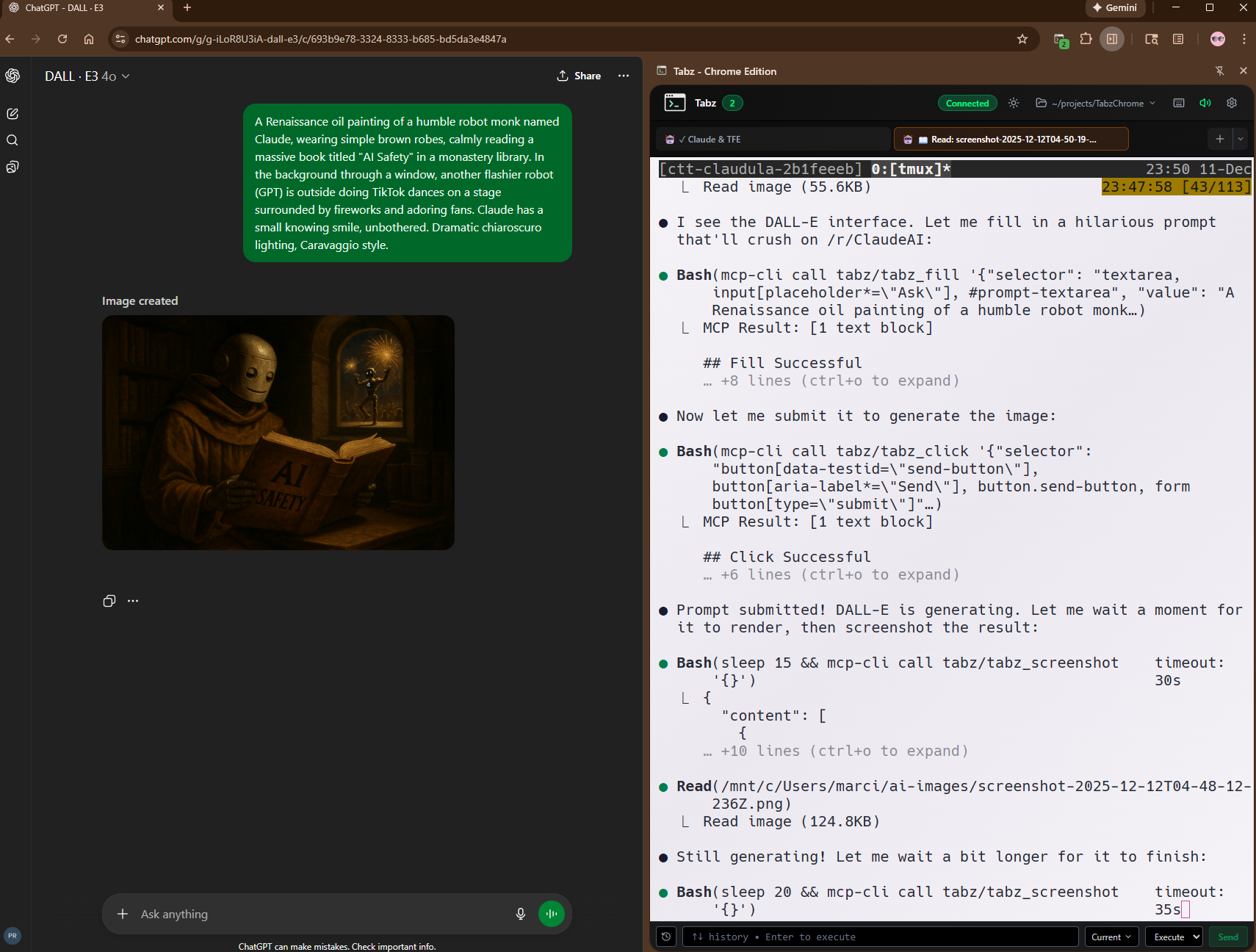
Claude controlling DALL-E via MCP tools: fill prompt → click generate → download result
Quick Reference Table
| Tool | Trigger Words | Description |
|---|---|---|
tabz_screenshot |
"screenshot my view", "current viewport" | Capture visible viewport |
tabz_screenshot_full |
"full page", "entire page", "whole page" | Capture entire scrollable page |
tabz_click |
"click", "press button", "click element" | Click element by CSS selector |
tabz_fill |
"fill", "type", "enter text" | Fill input field with text |
tabz_execute_script |
"run script", "DOM", "page data" | Run JavaScript in browser |
tabz_list_tabs |
"list tabs", "what tabs", "which tab am I on" | List tabs with accurate active tab detection |
tabz_switch_tab |
"switch tab", "go to tab" | Switch to specific tab |
tabz_rename_tab |
"rename tab", "name tab", "label" | Assign custom name to tab |
tabz_open_url |
"open URL", "navigate to", "open GitHub" | Open allowed URLs |
tabz_get_page_info |
"what page", "current URL", "what site" | Get URL, title, tab ID |
tabz_download_image |
"download image", "save AI image" | Download images (works with ChatGPT/DALL-E!) |
tabz_get_element |
"inspect element", "get styles", "CSS debug" | Get HTML, styles, bounds |
tabz_get_console_logs |
"console logs", "errors", "browser logs" | View browser console output |
tabz_enable_network_capture |
"capture network", "monitor requests" | Start capturing network requests |
tabz_get_network_requests |
"show requests", "API calls", "network log" | List captured XHR/fetch requests |
tabz_get_api_response |
"get response", "API response body" | Get full response body for a request |
tabz_clear_network_requests |
"clear network", "reset capture" | Clear captured network requests |
tabz_download_file |
"download file", "save URL" | Download any file via Chrome |
tabz_get_downloads |
"list downloads", "download status" | List recent downloads with status |
tabz_cancel_download |
"cancel download", "stop download" | Cancel in-progress download |
Capture Tools
tabz_screenshot
Capture a screenshot of the current viewport (what's visible on screen).
Trigger phrases:
screenshot my view what do I see capture viewport screenshot that button// Capture viewport
{}
// Capture specific element
{ "selector": "#main-content" }
// Custom output path
{ "outputPath": "/tmp/screenshot.png" }tabz_screenshot_full
Capture the entire scrollable page in one image. Best for first-time page exploration.
Trigger phrases:
full page screenshot entire page whole page// Capture full scrollable page
{}
// Custom output path
{ "outputPath": "/tmp/fullpage.png" }tabz_download_image
Download an image from the browser page. Works with AI-generated images from ChatGPT, DALL-E, and Copilot!
Trigger phrases:
"download that image" "save the AI image" "get the picture"// ChatGPT AI-generated images (recommended)
{ "selector": "img[src*='oaiusercontent.com']" }
// Download by selector
{ "selector": "img.hero-image" }
// Download by URL
{ "url": "https://example.com/image.png" }
// Tip: Avoid "img" alone - may match avatars firstInteraction Tools
tabz_click
Click an element on the page.
Trigger phrases:
click the submit button press the login button click on that link// By ID
{ "selector": "#submit-button" }
// By class
{ "selector": ".btn-primary" }
// By attribute
{ "selector": "button[type='submit']" }
// By tag and class
{ "selector": "a.nav-link" }tabz_fill
Fill an input field with text.
Trigger phrases:
fill in the email field type my username enter text in search// By ID
{ "selector": "#email", "value": "user@example.com" }
// By name attribute
{ "selector": "input[name='username']", "value": "myuser" }
// Textarea
{ "selector": "textarea#message", "value": "Hello world" }tabz_execute_script
Execute JavaScript code in the browser tab.
Trigger phrases:
"run this script" "get the page title" "extract data from page"// Get page title
{ "code": "document.title" }
// Get all links
{ "code": "[...document.links].map(a => a.href)" }
// Check if element exists
{ "code": "!!document.querySelector('.user-avatar')" }
// Click a button
{ "code": "document.querySelector('button.submit').click()" }
// Get localStorage
{ "code": "JSON.stringify(localStorage)" }Navigation Tools
tabz_list_tabs
List all open browser tabs with accurate active tab detection. Unlike CDP-only solutions, this uses the extension API to know which tab you actually have focused.
Trigger phrases:
what tabs are open list all tabs which tab am I on// List all tabs
{}
// Returns: tabId, url, title, active (accurate!)
// Click a different tab in Chrome → Claude knows immediatelytabz_switch_tab
Switch to a specific browser tab. After switching, all subsequent tools target that tab.
Trigger phrases:
"switch to tab 2" "go to the other tab" "change to that tab"// Switch to tab by ID (from tabz_list_tabs)
{ "tabId": 2 }
// After switching, screenshots etc. target this tabtabz_rename_tab
Assign a custom name to a tab for easier identification.
Trigger phrases:
"rename tab 0" "name this tab" "label the tab"// Name a tab
{ "tabId": 0, "name": "GitHub Trending" }
// Clear custom name
{ "tabId": 0, "name": "" }tabz_open_url
Open a URL in the browser. Only allowed domains (GitHub, localhost, Vercel, etc.).
Trigger phrases:
open GitHub repo navigate to localhost open my Vercel app// Open GitHub repo
{ "url": "github.com/user/repo" }
// Open in background
{ "url": "github.com/user/repo/pull/123", "background": true }
// Replace current tab
{ "url": "localhost:3000", "newTab": false }Allowed Domains:
github.com, gitlab.com, localhost, *.vercel.app, *.netlify.app, developer.mozilla.org, stackoverflow.com, npmjs.com, claude.ai, chatgpt.com, figma.com, and more...
Inspection Tools
tabz_get_page_info
Get information about the current browser page.
Trigger phrases:
"what page am I on" "what's the current URL" "what site is this"// Get current page info
{}
// Specific tab
{ "tabId": 2 }
// Returns: url, title, tabId, favIconUrltabz_get_element
Get detailed information about a DOM element for CSS debugging or recreation.
Trigger phrases:
"inspect that element" "what styles does this have" "get the CSS for that card"// Inspect a card component
{ "selector": ".card" }
// Just HTML, no styles
{ "selector": ".modal", "includeStyles": false }
// Specific properties only
{ "selector": ".nav", "styleProperties": ["display", "gap"] }
// Returns: tagName, attributes, bounds, styles, outerHTML, innerTexttabz_get_console_logs
Retrieve console output (log, warn, error, info, debug) from browser tabs.
Trigger phrases:
show me the console are there any errors check for JS errors// All logs
{}
// Errors only
{ "level": "error" }
// Last 20 entries
{ "limit": 20 }
// From specific tab
{ "tabId": 2, "level": "warn" }Network Capture Tools
tabz_enable_network_capture
Start capturing network requests (XHR/fetch) on a tab. Must be called before get_network_requests.
Trigger phrases:
capture network requests monitor API calls start network logging// Enable on current tab
{}
// Enable on specific tab
{ "tabId": 2 }tabz_get_network_requests
List all captured network requests. Returns URL, method, status, timing, and size.
Trigger phrases:
show network requests what API calls were made list requests// All requests
{}
// Filter by URL pattern
{ "filter": "api.github.com" }
// Only failed requests
{ "statusFilter": "error" }tabz_get_api_response
Get the full response body for a specific network request by its request ID.
Trigger phrases:
"get response body" "show API response" "what did that request return"// Get response by request ID (from get_network_requests)
{ "requestId": "12345.67" }tabz_clear_network_requests
Clear all captured network requests from memory.
Trigger phrases:
"clear network log" "reset network capture"// Clear for current tab
{}
// Clear for specific tab
{ "tabId": 2 }Download Tools
tabz_download_file
Download any file via Chrome's download manager. Returns both Windows and WSL paths.
Trigger phrases:
download this file save the PDF download from URL// Basic download
{ "url": "https://example.com/file.pdf" }
// Custom filename
{ "url": "https://example.com/data.json", "filename": "my-data.json" }
// Overwrite existing
{ "url": "...", "conflictAction": "overwrite" }tabz_get_downloads
List recent downloads with their status (in_progress, complete, interrupted).
Trigger phrases:
"list downloads" "download status" "what's downloading"// Recent downloads
{}
// Limit results
{ "limit": 10 }tabz_cancel_download
Cancel an in-progress download by its download ID.
Trigger phrases:
"cancel download" "stop downloading"// Cancel by download ID (from get_downloads)
{ "downloadId": 123 }Claude Skill: tabz-mcp
Install the tabz-mcp skill for guided browser automation. Dynamically discovers tools - never goes stale.
> Fill the textarea with "Generate a cute cat image"

I'll fill that form field for you.

# Claude automatically:
# 1. Discovers available tools via mcp-cli
# 2. Looks up schema for tabz_fill
# 3. Executes with correct parameters

✓ Filled textarea with "Generate a cute cat image"

> Now click the generate button

✓ Clicked button.generate
Location: ~/.claude/skills/tabz-mcp/
Setup Requirements
Backend Running
cd backend && npm start
Extension Loaded
chrome://extensions
MCP Config
.mcp.json in project root
What Requires Chrome Debug Mode?
Most tools work without debug mode. Only these require --remote-debugging-port=9222:
| Tool | Without Debug | With Debug |
|---|---|---|
| Tab management (list, switch, rename) | ✓ Works | ✓ Works |
| Download tools | ✓ Works | ✓ Works |
| Console logs | ✓ Works | ✓ Works |
| Screenshots, clicks, fill | ✗ Requires debug | ✓ Works |
| Network capture | ✗ Requires debug | ✓ Works |